Showing posts with label squaready. Show all posts

Sunday, July 15, 2012

Tiny Aliens


Camera Apps: Hipstamatic, CCD,
Extras: Ollo Clip 3in1 Lens System, Macro Lens

Additional Apps used for post processing:
PhotoForge2 - for the usual High Pass versions needed for re-sharpening the photos.
PhotoWizard - for the Emboss effect needed to work out the structure in the main picture. I was blending the embossed version 4x with the previous version in Blender to get the structure effect that you can see in the main picture (top)
Photo fx Ultra - for various enhancements and cropping operations. but especially for the Day for Night effect.
Blender - for many blending operations.
ArtistaSketch HD - for clean sketches of the photos needed to blend in Blender to bring out details in the picture. Pencil sketches are very useful to enhance the outlining in pictures. I usually blend them in either Multiply mode or Overlay mode. You must play around with it and see for yourself what works for your picture. I cannot provide you a basic recipe here. What works for one picture does not necessarily work for another picture as well. That's the experience I made.
TouchRetouch HD - for touch-ups. Strangely there had been some ugly spots left on the drawings created with ArtistaSketch so I removed them before using the sketch version in Blender.
Laminar - for it's great light system used in the picture where the mother plant deploys an egg from one of the cocoons.
iPhoto - for local softening. I love iPhoto for it's "brushes" that can be used locally in pictures. If you want to apply an effect on the whole picture you can choose that option in the brush settings.
LensFlare HD - for the light effects in the blue pictures. Sadly, working with LensFlare is a pain in the ass because it has no undo function which is very annoying to me, but in the end I managed to obtain some useful results nevertheless.
Pixlromatic - for some of the frames.
A+Signature - for the copyright watermarks

Well.... two days ago I looked at one of my wife's flower pots purely by chance which let me discover a beautiful miniature "forest" of some strange little plant I never saw before. So I decided to photograph it. I made over 200 photos, but only few had been really useful. First I shot with the 645pro - the camera app that currently provides you the very best picture quality available on the iPhone. But the 645pro pissed me off once more because it ruined a countless number of really good shots as it crashed again and again. It might provide the best picture quality, but that's useless if the app is crashing that often. So I switched to CCD, which is the other app that saves dRAWs in TIFF format. It's a pure and rather simple camera app without all the fancy camera-simulator-wannabe-pro stuff that comes with the 645pro, but at least it works reliably. It never crashed.


The night scene of that little jungle of alien plants... I really love that miniature world in that flower pot! The night effect had been created with the "Day for Night" effect in Photo fx Ultra. The rays of light had been added with LensFlare HD. The frame was added in Pixlromatic.


Alien Mother deploys an egg from one of the cocoons... Donno what strange little plant that is but isn't it fascinating how it grows in sort of a miniature jungle and how it multiplies itself? Other plants use the wind to distribute their seeds in the world, or use even living animals to carry the seeds to a location far from the mother plant. But this little plant deploys the seeds from cocoons it carries underneath. I only discovered this as I did some shots with the macro lens of the Ollo Clip. Here the iPhone plaid out it's big advantage of being slim and small, compared to other cameras, because there was only little space left in the flower pot to put the camera down enough for shooting from the ant view low over ground. The light effects had been created with Laminar first, then with LensFlare HD.


Hipstamatic shot of the tiny jungle. Combo used was John S lens with Ina's 1982 film


Another Hipstamatic shot made with the Ollo Clip Macro Lens. Combo John S / Ina's 1982.


The original CCD photo used to create the main picture on this page. I cropped it to 1:1 format using Squaready.


The flower pot, where that tiny little alien plant grows... Photo made with CCD, cropped and framed with Pixlromatic.

I'm sorry for not being able to provide you in depth step-by-step instructions about the making of of the pictures on this page but I really plaid around a lot with many different apps until I obtained satisfying results. But don't hesitate to contact me in case you got questions. I'll be happy to assist you with anything you want to know.
~~~~~~~~~~~~~~~~~~~~~~~~~~~~~~~~~~~~~~~~~~~~~~~~~~

Sunday, April 8, 2012

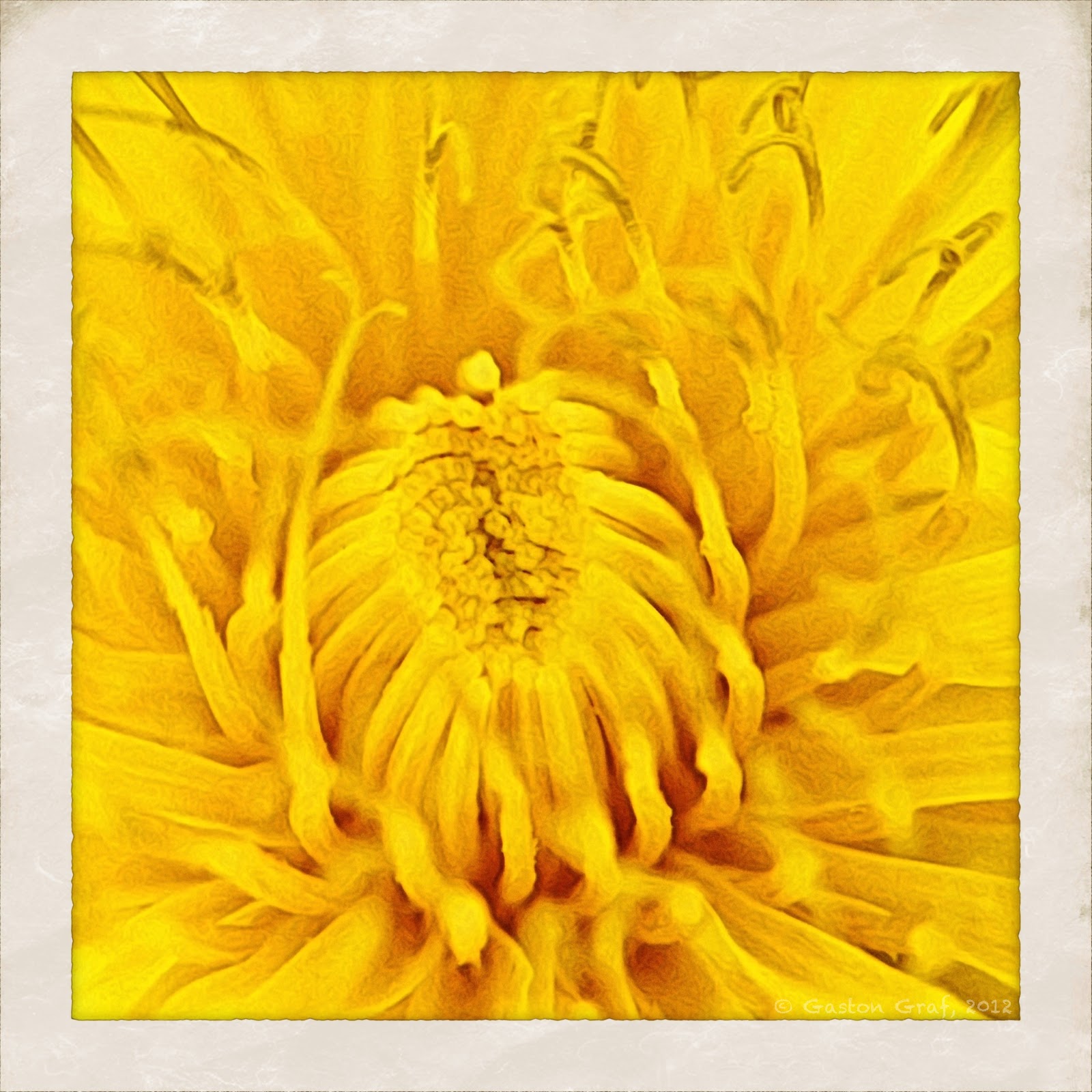
Dandelion


Camera App: Hipstamatic with Ina's 1969 film + JamesM lens, flash off
iPhone Model: 4S
Accessories: Ollo Clip Macro Lens

Apps used for post processing:
Moku Hanga HD - this is JixpiPix' new app! It comes with the same good user interface known already the other apps made by JixiPix. I love this app! It offers a lot of new creative possibilities to every iPhonoegrapher.
Blender - one of my all time favorite apps. Like so many times before, I used this app a lot on this picture too.
Photo fx Ultra - to enhance the colors as well as to create a pencil version.
PhotoForge2 - for a High Pass Filter. I saved that version to blend it in Blender with the previous color version. This was done to enhance contrast and sharpness. Then I was blending that result with the pencil version I had created with Photo fx Ultra to bring out the Moku structure a little more.
TouchRetouchHD - for a minor correction. I removed a simple black spot from the picture.
Squaready - to crop off the original Hipstamatic border. I cropped it off so late because I wanted to keep it first, but then I found it didn't look good on that picture anymore.
Camera+ - for the Vintage border.
A+Signature - for the Copyright watermark.

Well, it's finally Spring time and with all the Easter Bunnies hopping around also the Dandelion is blooming. I love that plant! It's blossoms are beautiful and it's semen is a little masterpiece of Mother Nature when it ripens and flies off on tiny little "parachutes" to secure the continued existence of this wonderful plant. Also one can make a very tasty salad from its leaves and tea from it's roots. Dandelion is a very valuable herb used in medicine by Native Americans, Chinese and Europeans. If you're interested to learn more about the values of the Dandelion I suggest you following this very informative Link to a page of the Medical Center of the University of Maryland.
I had a lot of fun making this picture. Once the blossoms will be gone, this and many other Dandelion will sure end up in my salad bowl ;o).


The photo serving to create this picture was made of the lower one of the three blossoms.

Monday, December 12, 2011

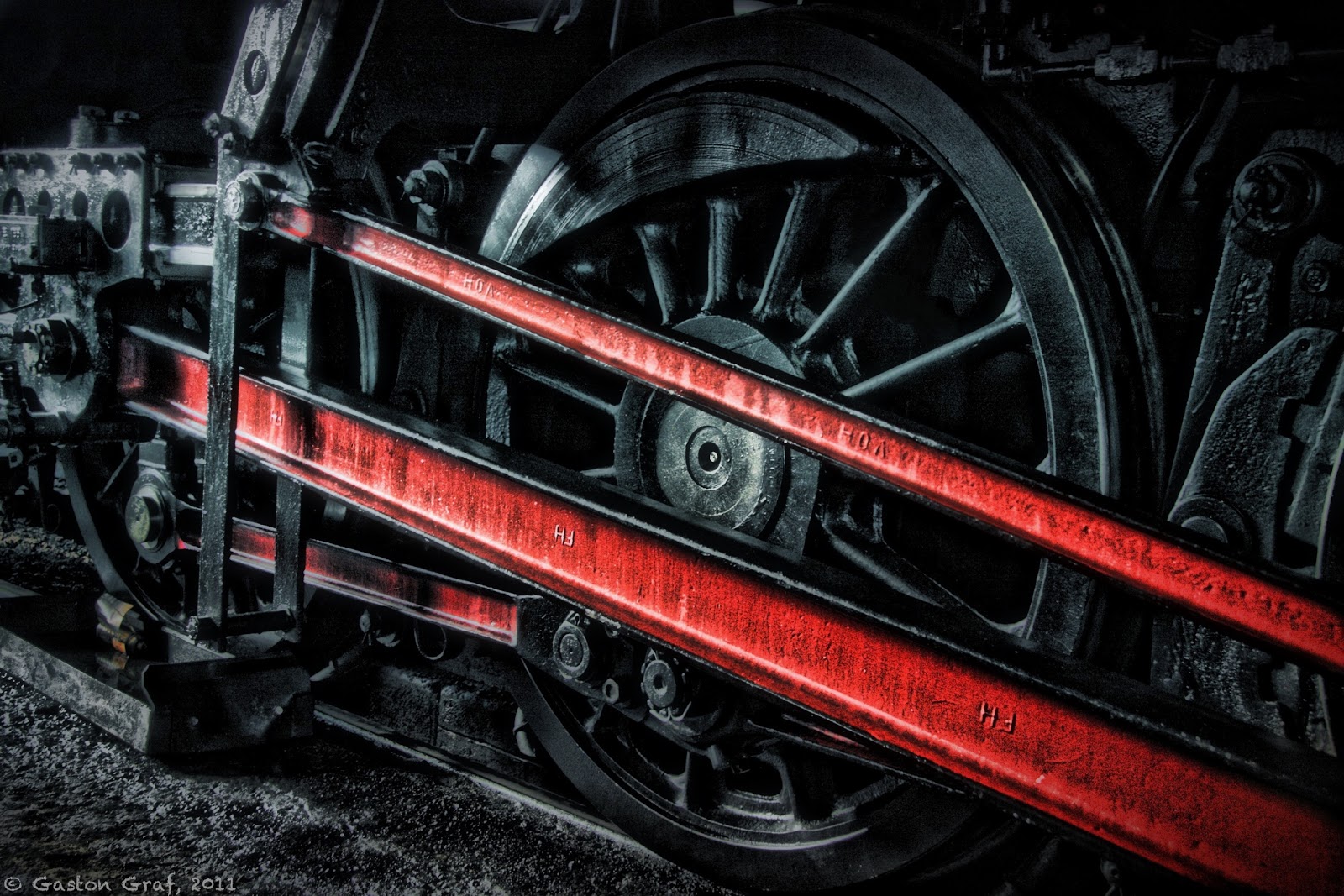
Black Wheel of Power


Camera: Canon EOS40D with 17-85mm EF USM kit lens.


RAW file developed in Canon Digital Photo Professional.
Photo processed on iPad2 with the following apps:
SimplyHDR-HD, Photo fx Ultra, Blender, FilterStorm Pro, Snapseed and TouchRetouch HD. Unfortunately I cannot provide details about every step I took to create this picture because I was playing around with a lot of apps but in the end I wasn't satisfied with the results so I went back to the beginning and restarted from HDR version made with SimplyHDR-HD. I used Photo Fx Ultra + Blender to work out the colors because I wanted to have a deep black wheel. I resized the picture in FilterStorm Pro, added some structure in Snapseed and removed some unwanted white spots with TouchRetouch HD.
A+Signature was used for the copyright watermark, as usual.


This is one of the big power wheels of steam engine 5519, photographed as the engine was in the shed. Railroad friends may find more information at the website of 5519. Unfortunately the website is in German only but you may find photos of the engine in action if you click on the word "Foto" in the top row of the page.

This picture is based on an analog photo I made a few years ago, in 2005 maybe. I happened to just return with the old switcher engine 910 which is visible in the background, as 5519 rumbled onto the turning table.


In World War II, as the Grand-Duchy of Luxembourg had been occupied by the Germans, the Reichsbahn ordered a set of 20 steam engines of the class 42 at the "Wiener Lokomotivfabrik Floridsdorf (WLF)" in Vienna in Austria but the engines couldn't be delivered to the Germans anymore as the war then ended. So the national railroad company SNCFL received these engines by the end of 1948, beginning of 1949, registering them as class 55. Engine # 5519 had been build in 1948 in Vienna Floridsdorf. It's "Fabriknummer" (serial no.) was 17615. Initially, the German Reichsbahn had planned to let it run unter the number 42 2718.
In service of the SNCFL this type was mainly used to haul coal and ore trains. It remained in service until the early 1960s as the costly steam engines got replaced by new class 3600 (electric) and the new classes 1600 and 1800 (diesel).
I still remember 5519 rotting away in the town park of Bettembourg, as I was a boy of 14. But 8 years later some railroad enthusiasts made an incredible effort to restore and save it. Now good old 5519 lives a new life again as a very popular tourist attraction, hauling tourist trains to Germany, France and Belgium.


Btw: if you're interested to have a ride then please contact the operators from their website. You may order tickets over the Internet.


This is the Instagram version of my picture. I really cannot say which version I like most, the original size, or the square size. Decide for yourself:


Questions? Send me an email to (quaffit(at)gmail.com) or leave me a comment ;o)!
Note: Please replace (at) with @ in my email address. This is a simple measure to prevent spam bots from harvesting addresses.


~~~~~~~~~~~~~~~~~~~~~~~~~~~~~~~~~~~~~~~~~~~~~~~~~~~~~~
Wednesday, November 16, 2011

The Beauty of Destruction, part 4


Camera App: BracketMode

Additional Apps used for post processing:
ProHDR - to create a HDR picture from the photos made with BracketMode.
SimplyHDR - to enhance that HDR picture further.
PhotoWizard - to create a nice Crayon version of the HDR picture.
Blender - to blend crayon with HDR 50/50 in Normal mode.
Pixlromantic - for the frame called Sand and a b/w effect called Tom. I saved both versions, color+Sand and Tom+Sand, then I blend both in Blender to reduce color saturation a bit.
PhotoForge2 - for a High Pass effect.
Blender - to blend High Pass with the Pixlromantic version 50/50 in Overlay mode to enhance sharpness.
FilterStorm3 - to apply a mask because I wanted more sharpness only on the molten and burned steel surface.
TouchRetouch - for some minor corrections. There had been a few drops of burned steel that appeared just as white spots in the background so I removed them.
A+Signature - for the copyright watermark

Old electric locomotive #3609 is laying in pieces, her body brutally ripped apart by the claws of a huge wrecking machine; her entrails cut apart by a cutting torch.... This had been a part of her braking system. The part in the background is one of the brake blocks, which had been made of cast steel.

In previous posts I described how to use a Pencil version of your picture made in Photo fx to blend it with the normal version in Blender to receive a nice outlining effect. I now discovered an even better solution because PhotoWizard includes a really beautiful Crayon filter that gives you a beautiful picture you can either use as it is or use it to blend it in Blender. But PhotoWizard has much more to offer than just that. Another app that I recommend because of its nice filters and frames is Pixlromantic.

Below is the Instagram version of this picture. Additionally to the effects described above I used the Sophia effect which gave the picture a blueish tint on the burned steel. Also I did not sharpen the burned steel surface but I did not apply one of the typical Instagram filters either cause I did not like any of them on this picture.


~~~~~~~~~~~~~~~~~~~~~~~~~~~~~~~~~~~~~~~~~~~~~~~~~~~~

Sunday, October 23, 2011

Reading Greg's Diary


Camera App: QuickPix
Additional Apps used:
Squaready - to crop a 1:1 square picture from the original photo.
Perfectly Clear - to enhance the picture.
MonoPhix - to create a b/w layer. I love MonoPhix to create black and white pictures because it is very easy to use and it comes with color filters.
Blender - to blend the b/w layer with the color layer to reduce saturation. Blending mode was Normal, slider set to the middle 50/50. I did this in preparation for using SimplyHDR because HDR effects usually overdo it with saturation.
SimplyHDR - to create a HDR layer.
Blender - to blend the HDR layer with the normal color layer to reduce the HDR effect by 50%. That means both layers had been blend in Normal mode, slider set in the middle 50/50.
PicGrunger - to create a grunge version on Burlap, Strength set to 0, style chosen was Block Party.
PhotoSuite - to add nice photo frame.
A+Signature - to add my copyright watermark.
This afternoon I caught my youngest daughter Melina reading a book. It's German title is "Greg's Tagebuch" which translates as "Greg's Diary". It's a great reading for children and my daughter loves the whole series. We're a family of book worms anyway. We all enjoy reading books - real books, not the e-books. Although I also use Kindle on my iPhone to read novels sometimes I think that nothing compares to the real thing of holding a real book in one's hands for reading. Smelling the paper and the ink.... the sound of turning pages in a quiet room.... and the impatience to read on until the next page can be turned, the next chapter be closed.... nothing compares to that.
Melina hates to be photographed so I had to switch my iPhone to quiet mode and sneak up on her for shooting. Here QuickPix came in really handy. It allowed me to quickly snap up a whole lot of photos before Melina finally got aware of my presence, then yelling at me "get that damn camera away you crazy paparazzo freak!" (grin). Well, the unsharp Instaplus picture below shows you what I am talking about ;o).


~~~~~~~~~~~~~~~~~~~~~~~~~~~~~~~~~~~~~~


Sunday, October 9, 2011

Luxembourg City...


Camera: Canon EOS40D
Lens: 17-85mm EF USM Kit Lens

Apps used for processing (as far as I remember):

Squaready - my first step was it to cut a 1:1 piece out of my original photo so I used Squaready, which is a neat little app meant to prepare photos to use with Instagram and it's clones.
PerfectClr - to correct the heavily underexposed photo which had not been corrected in Canon's Digital Photo Professional before. I discovered PerfectClr by chance, after reading an article about the upcoming improvements of the iPhone's Camera App and Pictures App in iOS5. I downloaded it and I am very satisfied with the possibilities PerfectClr offers to enhance any photo. 
SimplyHDR - to create a HDR picture of my boring looking photo. I did two versions, one with the Smooth slider set to full left and one with it set to full right. HDR style used was Brown.
Blender - to blend the smooth picture with the detailed picture in Normal mode to reduce the effect by 50%. After saving that result I loaded it again in Blender together with the original color picture to blend it 50/50 in Normal mode again to give it back some color. The result looked already very nice but still too boring to me.
DynamicLight - to add a slight 25% effect of its beautiful Orton filter. I wanted a soft glow in my picture to the Orton is very useful for that. However one must be very careful with DynamicLight because the negative side effect of it's usually nice enhancements of a picture is the resulting grainy sky. 
PerfectlClr - I was loading my photo in PerfectlyClr again to lighten up the shadows. To do this I used the setting FixDark which is just perfect for serving that purpose. The resulting image was very clear in its shadows but the negative side effect was the sky which was now a bit too bright.
Blender again - to blend the brightened up picture with the previous darker one. At last I was happy with my picture. I now went on to try several apps and settings to enhance it further, among them being the Instagram apps like the original Instagram, Instaplus, Instacam and ClassicINSTA, but I wasn't much satisfied with the results so I tried qbro. The latter is really a nice app to create 1:1 size pictures and it comes with a bunch of very useful frames and filters. I created a version of my picture with the filter Burnt, which looked really great but what I disliked about it was the very heavy grain in the dark brown vignette.
Camera+ - finally gave me what I was looking for. I applied the Hipster filter with a 25% setting and used the Old-Timey border where I added the title of my picture to.
A+Signature - for the copyright watermark.

In my times before the iPhone I used to carry my DSLR around all the time. The old town of Luxembourg-City is a tourist magnet because of it's old architecture, the Palace of the Grand-Duke and the Cathedral Notre-Dame and I love to photograph the buildings too. I made the photo that served for creating this iPhoneography picture on a dull day in March 2008 from across the valley of the Petrusse but like I had no tripod with me and my DSLR equipment not being the best I end up with mostly underexposed photos. But I did not delete them again because I always think that even an underexposed photo may be useful some day. As I stumbled over the neat little app PerfectlyClr I used such an underexposed photo to test its capabilites. The result is what you see here as the main picture of my blog entry. Before I forget - below is the original photo that I made on March 8, 2008: