Showing posts with label eos40d. Show all posts

Wednesday, December 21, 2011

The Ruins of Montfaucon


Camera: Canon EOS40D with 17-85mm EF USM Kit Lens

Original RAW file developed with Canon Digital Photo Professional.

Apps used for post processing:
SimplyHDR-HD - for a HDR version.
ArtistaOil-HD - for an oil painting simulation.
Photo fx Ultra - for various effects and enhancements.
Blender - to blend a lot. I cannot remember how often I blend what version with what version. I just kept on playing around with it until my picture looked right to me.
TouchRetouch HD - for minor touchups
A+ Signature - for the copyright watermark.

May 4, 2008 I was visiting the region of Verdun in France together with two friends of mine, where one of the fiercest battles of the whole 20th century raged in World War 1. We planned to visit the US Military Cemetery of Romagne-sous-Montfaucon, but stopped on every occasion we found something that caught our interest. One of the places we stopped at was the ruins of the village of Montfaucon with the nearby monument erected for the U.S. troops that fought in this sector. The village of Montfaucon had been completely destroyed in the battle of Verdun. This picture shows the ruins of the church of Montfaucon, with the observation post build by the Germans. From this place. the German "Kronprinz" observed the battlefield.

There's a plaque attached to the observation post. It reads the following, original text (I did not do that translation):

HISTORY

THE RUINS WHICH YOU SEE HERE ARE WHAT WAS THE PARISH CHURCH OF THE VILLAGE OF MOUNTFAUCON (MOUNT FALCON) UNTIL 1914.

ON THIS PEAK, WHICH WAS 342 METERS (1.122 FEET) IN ELEVATION, MONTFAUCON WAS FOUNDED IN THE YEAR 587 BY THE MONK SAINT BALDERIC, GRANDSON OF CLOTAIRE, WHO ESTABLISHED A MONASTERY. TRADITION TELLS US THAT HE WAS GUIDED BY A FALCON, THE ORIGIN OF THE NAME OF THE VILLAGE.

BECAUSE OF ITS GEOGRAPHIC LOCATION, THIS VILLAGE HAS SUFFERED REPEATED INVASIONS AND WAS COMPLETELY DESTROYED MORE THAN TEN TIMES DURING THE COURSE OF HISTORY. HERE KIND EUDES LAUNCHED A GREAT BATTLE AGAINST THE NORMANS ON JUNE 24, 888.

ON 11. SEPTEMBER, 1914, THE VILLAGE, WHICH COMPRISED 900 INHABITANTS, WAS CAPTURED AND BURNED BY THE GERMAN ARMY. AS AN IMPORTANT STRATEGIC POINT, THE GERMAN ARMY ESTABLISHED 17 ARMED OBSERVATION POSTS (BLOCKHOUSES) IN THE RUINS. SOME OF THESE ARE STILL VISIBLE, NOTABLY THE ONE CALLED THE "OBSERVATOIRE DU KRONPRINZ" WHICH IS LOCATED AT THE CENTER OF THE OLD CHURCH.

DURING NEARLY FOUR YEARS FRENCH ARTILLERY SHELLED THE SITE WITHOUT RESULT OTHER THAN TO COMPLETE THE DESTRUCTION OF THE BUILDINGS.

ON 26 AND 27 SEPTEMBER, 1918, THROUGH THE COMBINED EFFORTS OF THE U.S. AND FRENCH ARMIES UNDER THE COMMAND OF GENERALS PERSHING AND GOURAND, A POWERFUL ATTACK PERMITTED THE U.S. 313TH REGIMENT OF THE 79TH INFANTRY DIVISION TO SEIZE THIS PEAK THIS NEW BATTLE OF MONTFAUCON PERMITTED THE ALLIES TO CLEAR THIS SECTOR OF THE FRONT AND TO MAKE AND ADVANCE OF MORE THAN 50 KILOMETERS (30 MILES).

TO COMMEMORATE THIS ACTION AND IN MEMORY OF MORE THAN 100,000 U.S. SOLDIERS WHO DIED OR WERE WOUNDED ON THE BATTLEFIELDS OF THE AREA, THE UNITED STATES OF AMERICA ERECTED THIS COLUMN OF GRANITE AS A TESTIMONIAL TO THEIR MANY SACRIFICES FOR FREEDOM.


~~~~~~~~~~~~~~~~~~~~~~~~~~~~~~~~~~~~~~~~~~~~~~~~~~

Monday, December 12, 2011

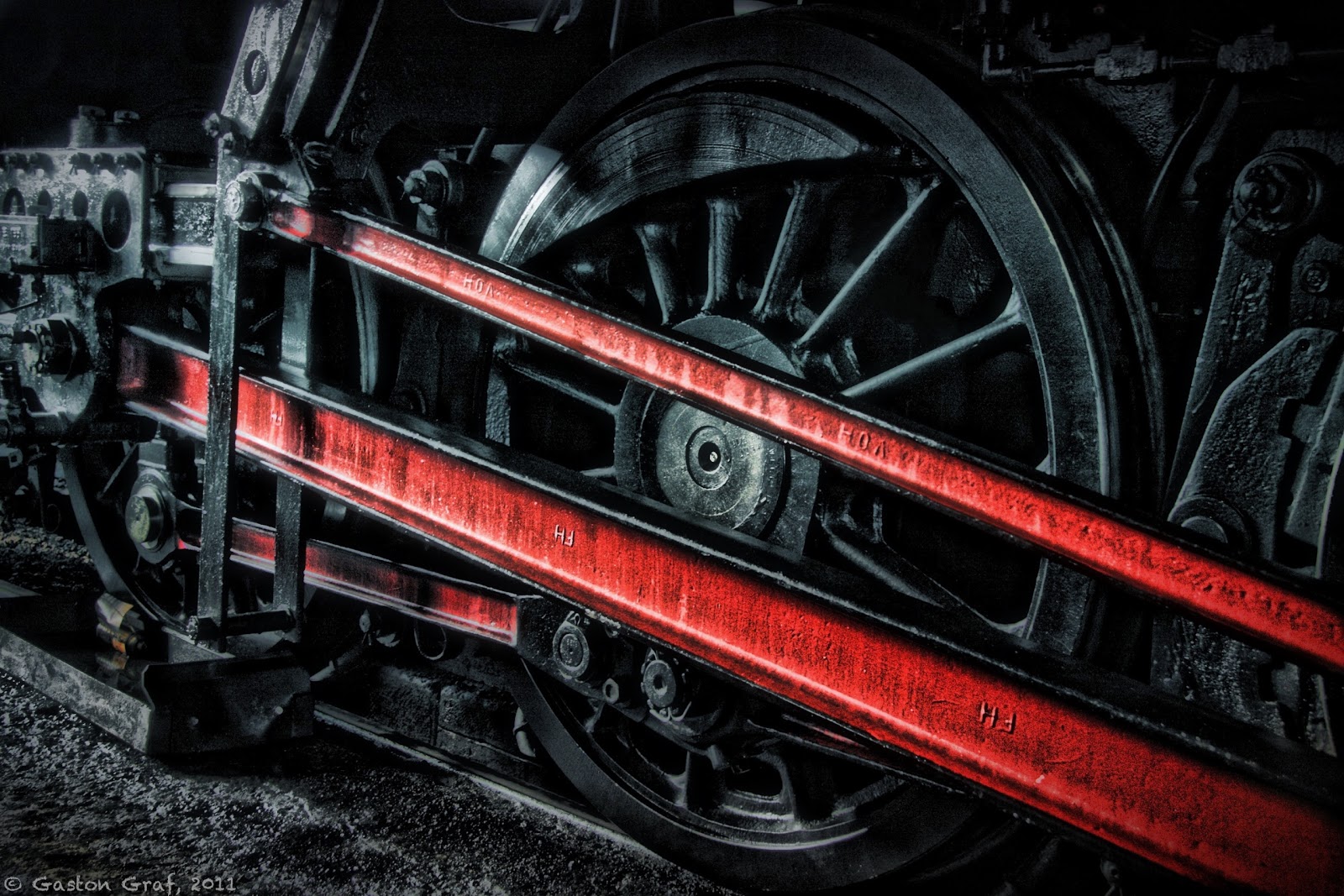
Black Wheel of Power


Camera: Canon EOS40D with 17-85mm EF USM kit lens.


RAW file developed in Canon Digital Photo Professional.
Photo processed on iPad2 with the following apps:
SimplyHDR-HD, Photo fx Ultra, Blender, FilterStorm Pro, Snapseed and TouchRetouch HD. Unfortunately I cannot provide details about every step I took to create this picture because I was playing around with a lot of apps but in the end I wasn't satisfied with the results so I went back to the beginning and restarted from HDR version made with SimplyHDR-HD. I used Photo Fx Ultra + Blender to work out the colors because I wanted to have a deep black wheel. I resized the picture in FilterStorm Pro, added some structure in Snapseed and removed some unwanted white spots with TouchRetouch HD.
A+Signature was used for the copyright watermark, as usual.


This is one of the big power wheels of steam engine 5519, photographed as the engine was in the shed. Railroad friends may find more information at the website of 5519. Unfortunately the website is in German only but you may find photos of the engine in action if you click on the word "Foto" in the top row of the page.

This picture is based on an analog photo I made a few years ago, in 2005 maybe. I happened to just return with the old switcher engine 910 which is visible in the background, as 5519 rumbled onto the turning table.


In World War II, as the Grand-Duchy of Luxembourg had been occupied by the Germans, the Reichsbahn ordered a set of 20 steam engines of the class 42 at the "Wiener Lokomotivfabrik Floridsdorf (WLF)" in Vienna in Austria but the engines couldn't be delivered to the Germans anymore as the war then ended. So the national railroad company SNCFL received these engines by the end of 1948, beginning of 1949, registering them as class 55. Engine # 5519 had been build in 1948 in Vienna Floridsdorf. It's "Fabriknummer" (serial no.) was 17615. Initially, the German Reichsbahn had planned to let it run unter the number 42 2718.
In service of the SNCFL this type was mainly used to haul coal and ore trains. It remained in service until the early 1960s as the costly steam engines got replaced by new class 3600 (electric) and the new classes 1600 and 1800 (diesel).
I still remember 5519 rotting away in the town park of Bettembourg, as I was a boy of 14. But 8 years later some railroad enthusiasts made an incredible effort to restore and save it. Now good old 5519 lives a new life again as a very popular tourist attraction, hauling tourist trains to Germany, France and Belgium.


Btw: if you're interested to have a ride then please contact the operators from their website. You may order tickets over the Internet.


This is the Instagram version of my picture. I really cannot say which version I like most, the original size, or the square size. Decide for yourself:


Questions? Send me an email to (quaffit(at)gmail.com) or leave me a comment ;o)!
Note: Please replace (at) with @ in my email address. This is a simple measure to prevent spam bots from harvesting addresses.


~~~~~~~~~~~~~~~~~~~~~~~~~~~~~~~~~~~~~~~~~~~~~~~~~~~~~~

Saturday, December 10, 2011

Billie


Camera: Canon EOS40D with 17-85mm EF USM kit lens.

RAW file developed in Adobe Camera RAW.
Photo processed on iPad2 with the following apps:

PhotoStudio HD - for a pencil drawing version.
FilterStorm Pro - to add the original photo to the pencil drawing, masking off the horse to keep the pencil effect only on the background. I used FilterStorm Pro for the masking albeit PhotoStudio HD offers the masking tool as well but the precision and zooming for mask painting is way better in FilterStorm Pro than it is in PhotoStudio HD.
Blender - to blend the FilterStorm version with the original photo because I wanted some color in the background.
Camera+ - for the inner Vintage frame.
SP PhotoTada - for the outher frame called Statesman. All other sliders set to "None".
A+Signature - for the copyright watermark as well as for Billie's name.

This is my daughter's Anna-Katharina's beloved Haflinger mare Billie, now 18 years old. She's a wonderful horse with a very gentle character and still as crazy as a filly. Born in Tyrol on February the 9th, 1993, Billie was bought as a young filly by the breeder family Gremling-Dauphin where she got trained in dressage and where my daughter started to learn horse-riding at the age of 6 (Billie was 5 then). At the beginning Anka had her little problems with some of  the training horses. The reason for it certainly was to be found in her still very young age, but as soon as Billie got assigned to her the problems vanished. Billie and Anka made a great team, becoming friends for life. So Billie was assigned to my daughter most of the times she went riding. But in 2002 Billie was about to be sold cause some dude woman wanted to buy her for her daughter... Anka was desperate and sad, fearing to loose her beloved friend forever, so I had to do something. I called the breeder and investigated about that woman and luckily for me the woman was still undecided whether to buy Billie or not so I took the occasion to make the deal right on the spot. I had to give up my dream of flying though, cause the money I spend for Billie was initially meant to pay my PPL A with. But a flying license can always be made - a friend like Billie however, cannot be found a second time in life. She's a member of our family since then, and we all love her dearly.
~~~~~~~~~~~~~~~~~~~~~~~~~~~~~~~~~~~~~~~~~~~~
Wednesday, September 21, 2011

How to: Smart-Sharpen Photos on the iPhone


Camera: Canon EOS40D
Lens: Canon 17-85mm EF USM Kit lens

Apps used:
Photoforge2 - to create a high pass layer.
Blender - to blend the high pass layer with the normal layer, slider at 100%, blending mode "Overlay". This method neatly sharpens the whole picture without adding noise. Look at the details on the jeans of the blacksmith! Zoom in and you can even see it's structure.
PhotoForge2 again - after sharpening the photo by blending the high pass layer with the normal layer I reimported the sharpened layer into PhotoForge to apply a Lomo filter as well as to add a white frame.
A+Signature - to add my copyright watermark

Some apps include the option to sharpen a picture but no matter what app I tried I realized that even the best apps end up with a lot of noise after sharpening, no matter if you are using PS Express, FilterStorm3, Iris or whatever. For that reason I applied sharpening filters only modestly. But I always wished to have the possibility to use the same procedure for smart-sharpening that I use in PhotoShop CS5 where I create a copy of my original layer, then apply a high pass filter to that layer, go to the layer's blending options and choose "Overlay" from the menu - et voilĂ  the picture is crystal clear and sharp. On the slider one can adjust the amount of sharpening. Sometimes 100% is a bit too much so you need to adjust a lower setting.

Ok, that's for PS on the big screen. Now I finally found a way to do the same thing on the iPhone, which will also work on the iPad. Currently PhotoForge2 seems to be the only app that comes with a high pass filter (as far as I know, but I may be wrong indeed since I don't know all the apps). I apply that filter to my original picture and save it as a new picture (=layer). Don't worry if your screen turns all gay after applying the filter cause you need to move the slider to the right to see an effect. I used a value of about 200. You don't need to adjust it to exactly 200.00 which is quite impossible. Just use any value close to 200.


After saving that picture I opened Blender where I added the original picture plus the high pass picture for blending. Settings: Blending mode "Overlay", Slider to 100%, original picture on the left, high pass picture on the right. Please see the screenshots below. Do you see the difference? The first picture is unsharpened, the second picture is sharpened:


I applied the same editing procedures to a set of six photos I made one day in June of 2009 as the blacksmith was at the stables to give my daughter's horse Billie a manicure. I asked him for his permission to make photos while he works and he agreed. Billie is a very gentle horse. She truly enjoys to have her hooves cared for - well, but that's part of the female character, isn't it ;o)?


The apps that I used on this set are all top notch apps on the long list of photo editing apps, not just because of the possibilities they provide to create beautiful pictures but also because all of them don't ruin the original photo resolution on saving. I processed all of the above photos in original resolution of 3888x2592px. The iPhone needed some time for processing but this wasn't much more than it needs to process original iPhone pictures. I tested this on a Hipstamatic photo that I also sharpened. See below: 


~~~~~~~~~~~~~~~~~~~~~~~~~~~~~~~~~~~~~~